Sessions that book like a real practice
A booking page for consulting. Offerings, duration, deposits, and a page that looks like the business — not a scheduler widget.
Built for consultants who sell time, not a cart

Bookable everywhere your customers already are
Google, social, texts — and AI assistants. The link works as a first-class channel wherever discovery happens.
 Google
 Facebook
 Instagram
 TikTok
 WhatsApp
 Messages
 ChatGPT
 Claude
 Gemini
For consulting
Challenges we solve
The day-to-day problems this work actually has — and what the booking page does about them.
Emailing your availability
Intro calls and sessions on the page. Clients pick a time instead of “what's open this month?”
A scheduler bolted onto a bio
A page that looks like the practice — offerings, duration, and Book now — not a widget.
Booked in twenty minutes
Lead time and weekly hours so only sessions you're willing to take appear.
Intro calls, retainers, and Book now
Publish what you actually sell. Clients pick a session instead of emailing “what’s your availability this month?”
- Services and prices
- Photo gallery
- Reviews from real customers
- Book now and quote requests
- Deposits at checkout
- Your brand colour and theme
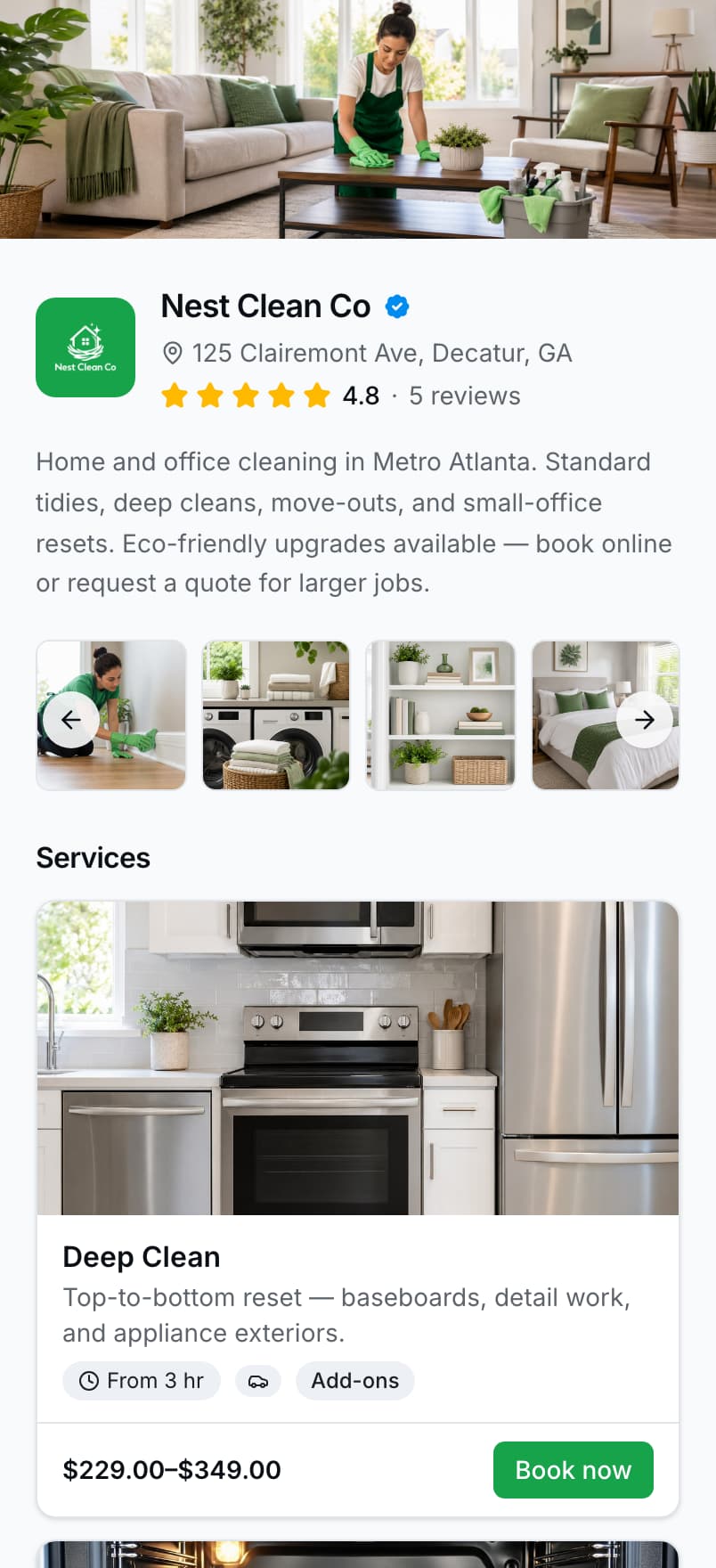
A real screenshot of the nestclean demo page. Services, prices, and ratings are seeded demo data.
Get paid before you show up
Deposits, reminders, and a calendar that only offers times you can take.
- Deposits before the jobCollect a flat or percentage deposit when they book — so ghosts don't eat your slot.
- Automatic remindersSMS and email confirmations and reminders go out for you. Fewer “what time again?” texts.
- Optional booking termsAdd terms customers accept at checkout — clear expectations before you show up.
- Card payments that stickStripe Connect on your page. Cash, Venmo, and Zelle stay available as offline options.
The practice, without the inbox shuffle
Hours and lead time so only real sessions show. Invoices and reminders when the work is billed.
Get booked
- Accept bookingsCustomers pick a service, choose a time, and confirm — no back-and-forth DMs.
- Calendar & schedulingWeekly hours, lead time, and time off — slots stay accurate in your timezone.
- Quotes & quote requestsSend outbound quotes or let customers request custom jobs.
- ServicesClear names, prices, and durations so customers book the right job the first time.
- ProfileBrand, bio, gallery, and contact on your public page before they hit Book now.
Get paid
Run the day
- Today's routeLeave-by times, drive summaries, and next-stop directions for today's in-person jobs.
- Bookings plannerSee the day as a time grid so overlaps and gaps are obvious before you leave.
- CustomersOne place for who you serve — phone, history, and who is due again.
- Customer vehiclesYear, make, model, and plate on file so every booking names the right car.
- Vehicle inspectionsPhotos and notes on the vehicle so condition is recorded before and after the job.
- SMS & email updatesCustomers get confirmations and reminders. You get notified when someone books.
Grow
- ReviewsCollect ratings on your page and ask for a review when the job is done.
- Near-me provider directoryGet found by customers searching nearby — not only people who already have your link.
- Analytics dashboardSee link views and what's converting across 24-hour, 7-day, and 30-day windows.
- Marketing trackingPaste Google and Meta ids once — your public page fires the booking events.
Practices that stopped the availability email
A professional page. Clients book a session. You keep the work in one calendar.
Clients book a session from the page. I stopped emailing my availability every week.
ConsultingIllustrative Lead time keeps same-day off the calendar. The page only shows hours I'll actually take.
ConsultingIllustrative
One link for every place customers find you
Google, referrals, Instagram, flyers — same booking page.
- Google BusinessPut your booking link in the website field so Maps visitors can book.
- Texts & referralsReply to “are you free Saturday?” with one link instead of five messages.
- Instagram & TikTokDrop it in your bio when social is where customers find you.
- Email signatureEvery outbound email carries a Book now path.
- Flyers & QRPrint a code on door hangers, cards, or yard signs.
- Anywhere elseOne URL — yourname.bookinglink.ai — works in every channel.
Live before the next intro call
Claim a link, add your offerings, share it in the signature and on LinkedIn.
Claim your page
Name, bio, and a look that matches how you already show up.
Add the sessions you sell
Intro, hourly, package — with duration and price. Lead time so you’re not booked in 20 minutes.
Share it where clients already are
Email signature, LinkedIn, Google — one link, not a stack of tools.
Run the day from your phone. Not from your DMs.
See today's bookings, take payments, and manage customers without juggling three inboxes.
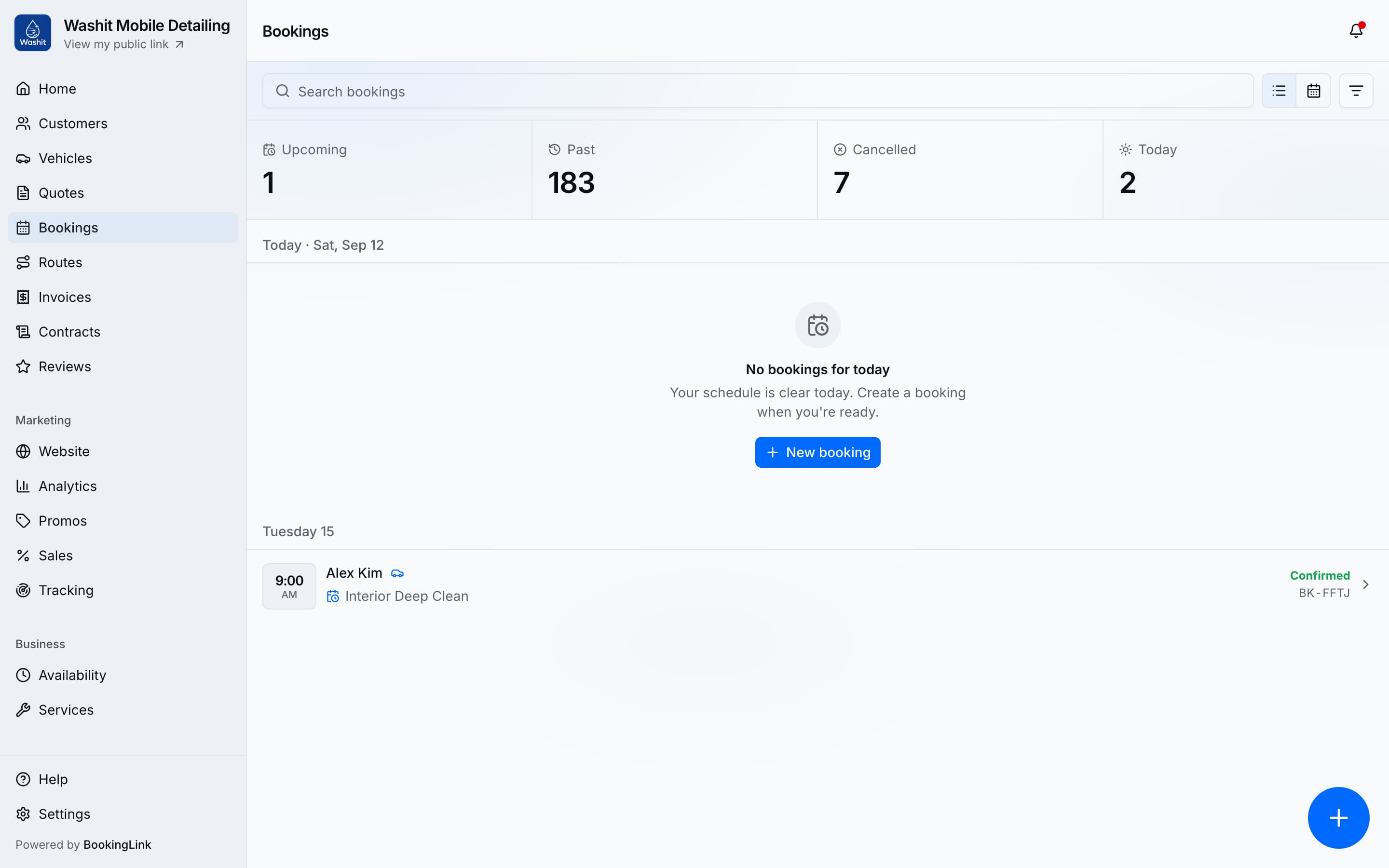
- Bookings, quotes, and invoices in one place
- Card payments with Stripe Connect
- Today's route between jobs
- Runs from the phone in your cab
A real screenshot of the washit demo account. Bookings and customer names are seeded demo data.
Get paid through the processor you already use
Connect Stripe or Square — or both, and choose which one runs your cards. Money settles into that account, not into a wallet you have to cash out.
- Connect a Stripe Express account and take cards on your booking page, on invoices, and in person.
- Already running Square in the shop? Connect the seller account you have and keep every payment in it.
What your customers pay with


Take the full price at checkout, or a deposit at booking and the balance when the job is done.
And the ways you already get paid
Cash, Venmo, and Zelle stay on the booking page as offline options, and record against the invoice the same way.
Card processing fees are your processor's own. $1 per transaction goes to us, the first time a customer pays an invoice.
Pay per transaction.
No monthly subscription.
Full product access for every business. You pay when you invoice a customer.
$1per transaction
First time a customer pays an invoice, invoiced monthly. Unpaid invoices aren't billed.
Get started- Public booking page
- Unlimited bookings and quotes
- 8 gallery photos
- 7-day and 30-day analytics
- Verified badge
- Editable pricing tiers
- Calendar feed (iCal)
- Customers CRM stats + Due filter
- Accept card payments (Stripe Connect)
- Google review handoff
- Booking reminders
- Promos and sales
Add a card to open your dashboard. $1 per transaction when a customer pays. No subscription.
Frequently asked questions
I don’t want same-day bookings. Can I set lead time?
Yes. Set lead time and weekly hours so only slots you’re willing to take appear.
Some work is custom. Do I have to list a price?
List the sessions you can price. Turn on quote requests for retainers or scoped work.
How does pricing work?
There's no monthly subscription. You get the full product, and we charge $1 per transaction — the first time a customer pays an invoice — invoiced monthly. Unpaid invoices aren't billed.
Do I need a credit card?
Yes, before you can open the dashboard. Sign up with email or Google, finish your profile, then add a card. We use it to invoice the $1 per transaction — not a monthly subscription. You are not charged at signup.
What's my custom URL?
You claim a subdomain during signup — like yourname.bookinglink.ai. Put it in your Google listing, a text signature, a referral message, a flyer QR, or your bio.
Free tool
Consulting terms and conditions, written for you
Answer a few questions about how you work and get plain-English General terms built around the disputes that actually happen in consulting. Download the PDF, or load them straight into your booking page so customers accept them before they book. No account needed.
Stop emailing your availability
Add your sessions and share the link. Live in about five minutes.
Add a card to open your dashboard. $1 per transaction when a customer pays. No subscription.